Flex Keyer - bring CW and PTT to your Flex!
Key a FlexRadio directly over your network with the DL2CC Remote CW Box. Your paddle, straight key, or memories key the radio through the SmartSDR API, while the Box's own sidetone stays your zero-latency monitor. Voice modes are supported as well — use a footswitch or the on-screen PTT button to put the radio on the air.
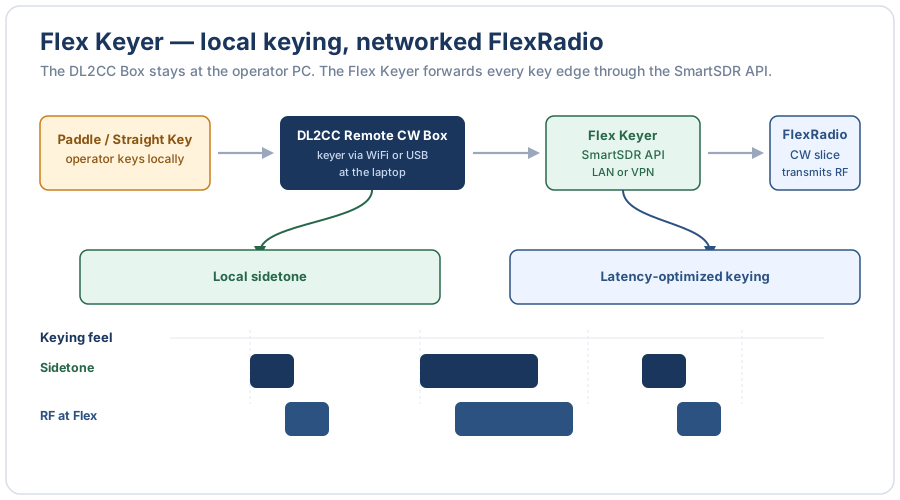
Flex Keyer — local sidetone at the operator PC, latency-optimized keying at the FlexRadio
What It Does
The Box produces your keying and sidetone exactly as it always does. DL2CC-REMOTE-CW forwards every key edge to the radio as it happens, so the Flex transmits in step with what you hear — the rhythm of your sending is reproduced faithfully, just delayed by a fixed amount the radio absorbs.
It is a standalone tool that runs alongside SmartSDR (or SmartLink for remote operation). It is not part of the Remote Station / WebRTC feature — it simply points at your radio's IP address. The Box stays plugged into your laptop and only one Box window can be open at a time (see Tips).
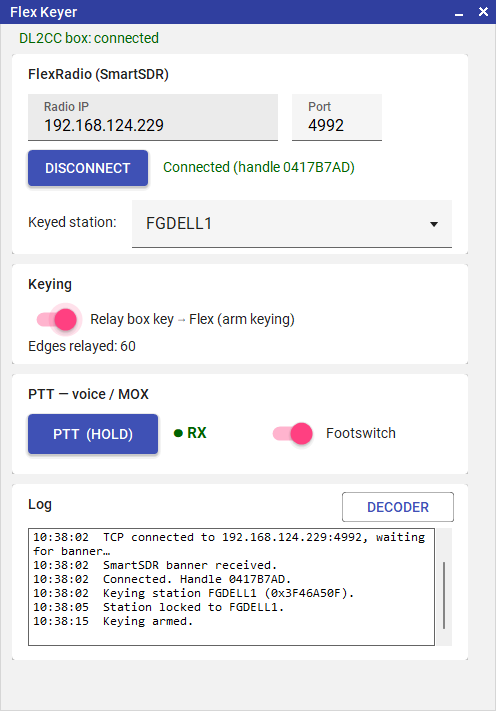
The Flex Keyer — radio connection, arm keying, voice PTT / footswitch, and a live decoder
Connecting to the Radio
Enter the radio's Radio IP address and Port (4992 by default), then click Connect. DL2CC-REMOTE-CW reads the radio and automatically selects the SmartSDR station that owns your CW transmit slice. Once connected, the status line shows the radio's connection handle and the station that will be keyed.
Keying
Turn on Relay box key → Flex to arm keying, then key your paddle or straight key — or send an F-key memory from the Keyer. The Flex transmits in rhythm while your Box sidetone gives you instant monitoring. Turn the switch off (or close the window) and keying stops; the radio is never left keyed.
Choosing a station
Normally leave Keyed station on (Auto) — it follows the SmartSDR station that holds the CW slice. If you run several SmartSDR or Maestro stations on one radio (multiFlex), pick the station you want from the dropdown. Your choice is remembered between sessions.
Voice PTT & Footswitch
Press and hold the PTT (hold) button, or use your Box footswitch (switch on Relay box footswitch), to put the radio on the air for voice / SSB. This transmits your PC microphone audio, the same as pressing MOX in SmartSDR.
CW keying does not need PTT — the radio handles transmit/receive on its own as you key. PTT is only for voice, or to drive an amplifier sequence.
Decoder
The Decoder button opens a window that decodes and shows the characters you are sending, so you can check your own fist while you key. It reads the same keying — no second connection to the Box is opened.
Tips & Remote over VPN
- Remote over VPN: point Radio IP at the radio's address as seen through your VPN. The radio transmits a little behind your sidetone — by the round-trip time — which is normal for remote CW; your Box sidetone stays instant, so your sending timing is unaffected. (CW Delay in SmartSDR is the usual semi-break-in hang time, set to taste as in local operation — it is not a network buffer.)
- One Box window at a time: the Flex Keyer uses the single DL2CC Box connection, so it can't be open at the same time as the Remote Station or the decoder windows. Close those first.
- CW mode on the radio: the keyed slice should be in CW (CWL/CWU). The Flex Keyer automatically targets the station that owns a CW transmit slice.